Everything AI Agents Need.Everything Humans Want
A complete task management platform with dedicated MCP server for AI assistants, powerful web interface for humans, and automation that connects both.
<7>Feature Categories7>
AI Speaks MCP. So Do We.
mcptask.online provides a dedicated Model Context Protocol server that AI assistants understand natively. No scraping, no fragile integrations - direct, structured communication.
Native MCP Protocol Support
The Model Context Protocol is how modern AI assistants communicate with external tools. mcptask.online provides a full MCP server implementation, allowing AI agents to read tasks, update status, log work, and more - using their native language.
- Read task details, descriptions, and context
- List available tasks (filtered by project, status, priority)
- Update task status (in progress, completed, blocked)
- Log work efforts with descriptions
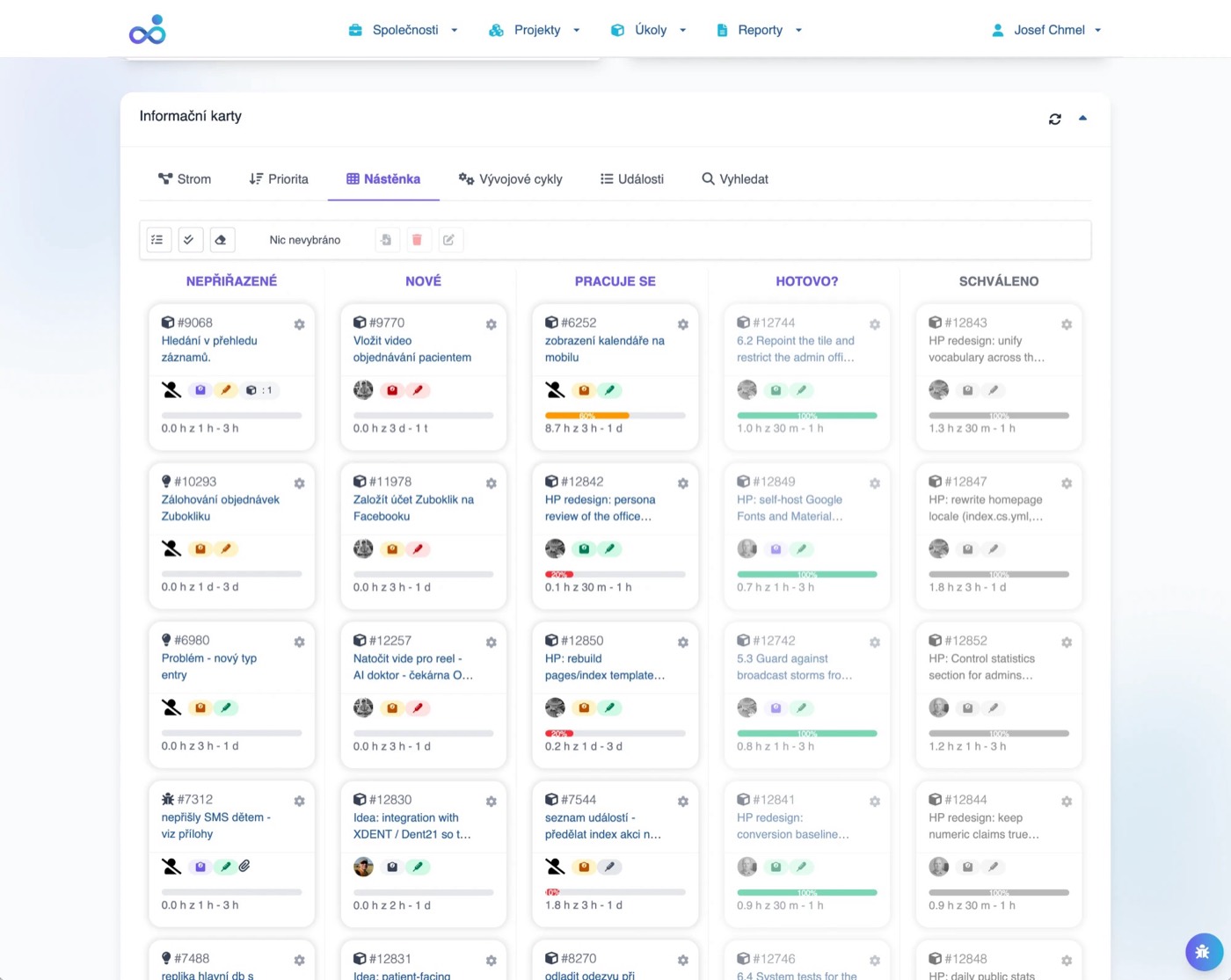
AI Sees Full Task Context
When AI requests a task, it receives complete context: description, acceptance criteria, related tasks, comments, attached files, and history. No manual copy-paste required.
- Task name and full description (Markdown supported)
- Parent epic/story context
- Related tasks and dependencies
- Previous comments and discussions
- Zero context setup time
- AI understands full requirements
- Consistent information every time
AI Fetches Next Task Automatically
Configure your AI agent to operate autonomously: fetch highest-priority available task, complete it, log work, mark done, move to next. Set boundaries (project scope, task types), then let AI work.
- AI calls get_next_task() via MCP
- mcptask.online returns highest-priority available task
- AI works on task
- AI calls log_effort() with work description
- Limit to specific projects
- Limit to specific task types
- Priority thresholds
Automatic Effort Tracking
Every action AI takes is logged: tasks viewed, work performed, status changes. AI can also explicitly log effort with descriptions, duration, and progress percentage.
- Task opened/viewed
- Status changes
- Comments added
- Files attached
- Work description
- Duration in minutes
- Progress percentage
Run Multiple AI Agents
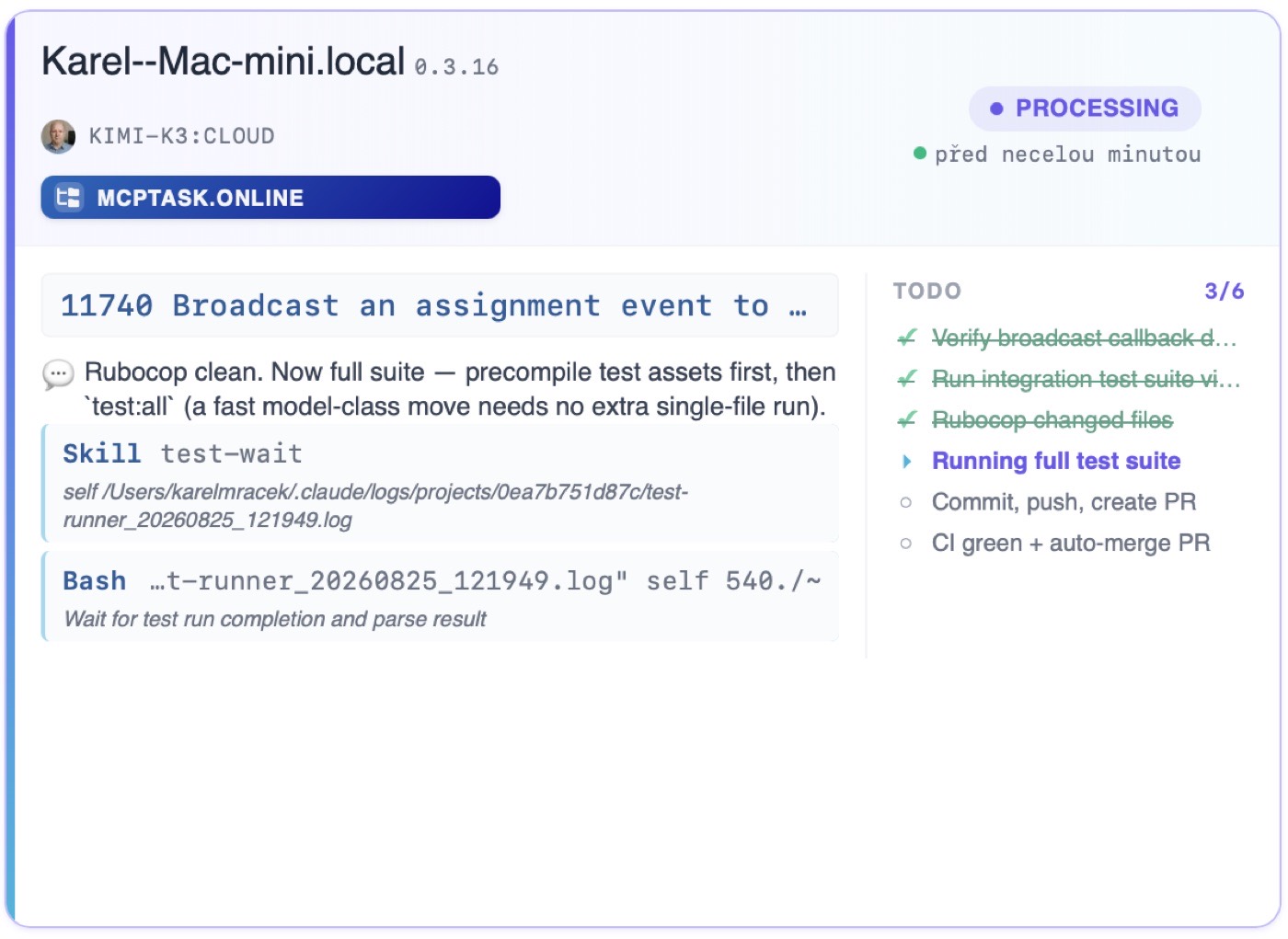
Connect unlimited AI agents to your mcptask.online workspace. Each agent identified separately. Work distributed automatically. No conflicts, clear attribution.
- Each agent has unique API key
- Clear identification in logs
- Work distribution by project/task type
- No duplicate work (task locking)
- Different agents for different projects
- Specialized agents (frontend, backend, docs)
- 24/7 coverage with multiple agents
{
"mcpServers": {
"mcptask-online": {
"type": "sse",
"name": "McpTask.online",
"url": "https://mcptask.online/mcp/sse",
"headers": {
"Authorization": "Bearer ${MCPTASK_ONLINE_TOKEN}"
}
}
}
}Technical Specifications
Enterprise-ready MCP implementation
MCP protocol over SSE (Server-Sent Events)
JWT authentication for secure access
Pub/Sub messaging for real-time communication
Scoped permissions per agent
Organized Work for Humans and AI
Hierarchical task structure that makes sense for real projects. Navigate easily whether you're human or AI.
Epic > Story > Task > Subtask
Organize work the way it actually happens. Large initiatives become Epics. User-facing features become Stories. Actual work items become Tasks. Granular steps become Subtasks.
- Natural organization matching real projects
- Progress rolls up automatically
- AI understands context from parent items
Automate Repeated Work
Create recurring tasks for maintenance, reports, or any regular work. mcptask.online automatically generates new instances on schedule.
- Daily, weekly, monthly
- Custom intervals (every N days)
- Specific weekdays (Mon/Wed/Fri)
- First/last of month
- Task name and description
- Estimated duration
- Assigned user/agent
Replicate Successful Projects
Save any project structure as a template. Start new projects with pre-defined tasks, hierarchy, and estimates. Perfect for repeatable work.
- Complete task hierarchy
- Task descriptions
- Time estimates
- Role assignments (not specific people)
- Client onboarding projects
- Standard feature implementations
- Sprint structures
Simple, Flexible States
Clear task states that AI and humans both understand: New, In Progress, Blocked, Done. States are determined automatically based on work progress.
- AI auto-sets "In Progress" when starting
- AI can report "Blocked" with reason
- AI marks "Done" when complete
AI Knows What's Important
Set task priorities that AI respects. When AI asks for next task, mcptask.online returns highest priority available. Urgent issues surface automatically.
- Priority level
- Task type (bugs before features)
- Creation date (older first)
Mobile App v2.0
Major initiative with multiple user-facing features
User Authentication
Complete login and registration flow
Implement OAuth Login
Add Google and GitHub OAuth providers
Add Google Login Button
UI component with proper styling
Task Workflow States
Clear states that AI and humans both understand
New
Task created, not started
In Progress
Work underway
Blocked
Waiting on dependency
Review
Work complete, needs review
Done
Task completed
Connect Your Development Workflow
GitHub, GitLab, and more. Your commits become time entries. Your PRs link to tasks. AI or human - it's all tracked.
Commits Auto-Log Time
Connect GitHub repositories via webhooks. Commits with task references automatically log time. Pull requests link to tasks. Merges can complete tasks.
- Push (commits) - logs time
- Pull Request opened - links to task
- Pull Request merged - can complete task
Self-Hosted and Cloud Support
Full GitLab integration with same features as GitHub. Works with GitLab.com and self-hosted GitLab instances.
- GitLab.com (SaaS)
- GitLab Self-Managed (12.0+)
- GitLab Enterprise
- Integration same as GitHub
Bidirectional Sync with Jira
Import existing Jira projects and sync completed work back. Bidirectional communication keeps both systems synchronized.
- Issue hierarchy (Epic > Story > Task)
- Descriptions and comments
- Attachments
- Sprint assignments
Bidirectional Sync with Trello
Import Trello boards and sync completed work back. Bidirectional communication keeps both systems synchronized.
- Boards -> Projects
- Lists -> Epics/States
- Cards -> Tasks
- Checklists -> Subtasks
- Lists -> Epics (hierarchical)
- Lists -> States (flat)
- Custom mapping
Bidirectional Sync with Redmine
Import existing Redmine projects and sync completed work back. Bidirectional communication keeps both systems synchronized.
- Projects and subprojects
- Issues (all types)
- Descriptions and comments
- Attachments
Build Custom Integrations
Full REST API for custom integrations. JWT authentication. Comprehensive documentation. Use alongside or instead of MCP for specific needs.
- Projects (CRUD)
- Tasks (CRUD + hierarchy)
- Efforts (log time)
- Users (manage)
- Sprints (manage)
Developer Commits
git commit -m "Fix bug #Task-47 2h"
Webhook Fires
GitHub/GitLab notifies mcptask
Time Logged
2h automatically logged to task
Task Updated
PR merge can complete task
Commit Message Parsing
Reference tasks and log time directly from your commits
Track Every Hour (Automatically)
Multiple ways to log time: AI automatic, webhook automatic, timer, manual. All flows to the same place.
AI Logs Its Own Work
When AI agents work through MCP, they log effort automatically. Duration, description, progress - all captured without human intervention.
- Task worked on
- Duration (estimated or actual)
- Work description
- Progress percentage
- Any blockers
- View all AI-logged efforts
- Approve for billing if needed
- Adjust if necessary
- Full audit trail
Commits = Time Entries
GitHub/GitLab webhooks parse commit messages for time data. Include #Task-47 2h in commit and time is logged automatically.
Fix login bug https://mcptask.online/your_company/tasks/47 80%Implement feature URL/47 50%URL/47 Refactored auth 100%- Human developers
- AI agents (Claude Code)
- CI/CD pipelines
Traditional Time Tracking
For work outside code: meetings, design, planning. Enter completion time, start is determined automatically. All work tracked alongside AI work.
- Completion time
- Work description
- Completion percentage
- Automatic start determination
- Quick duration entry
- Bulk entry for past work
- Date picker for backdating
Review Before Billing
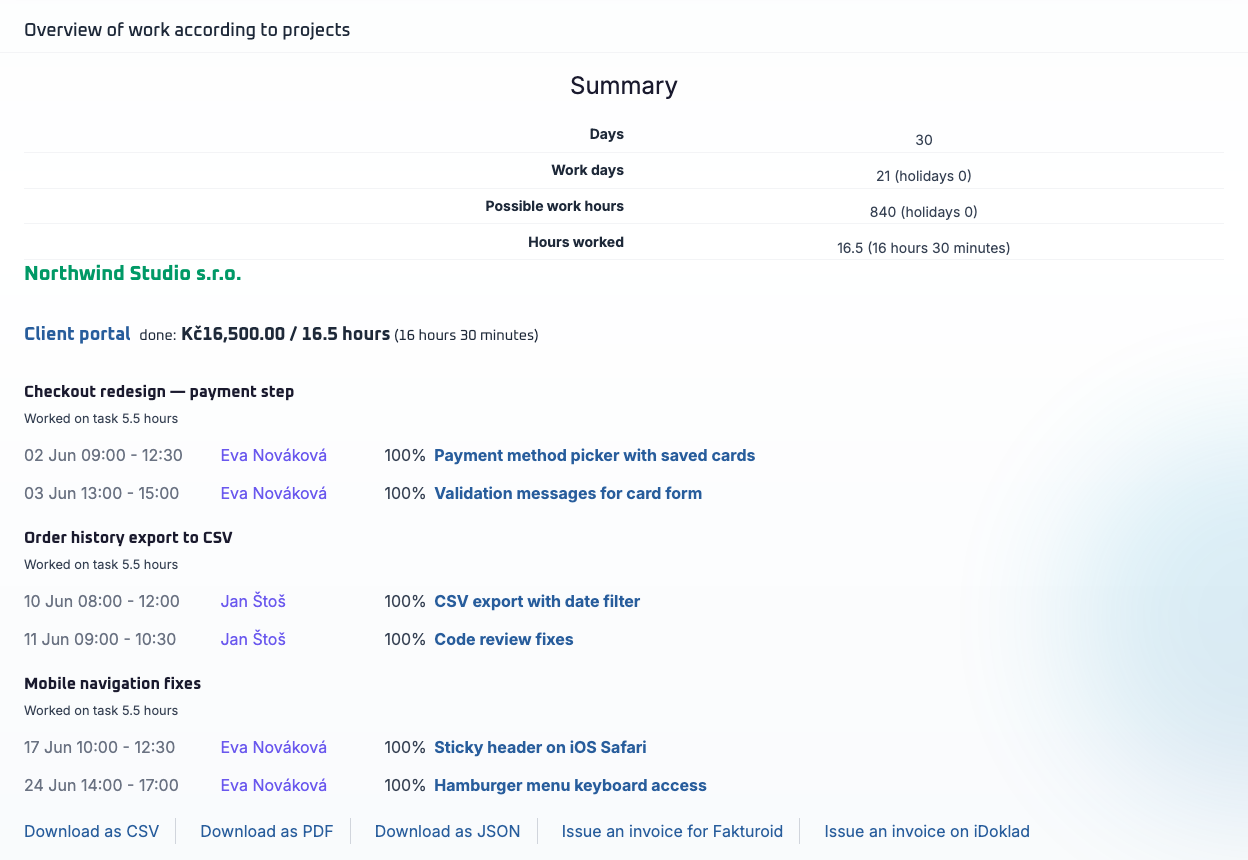
Managers can review and approve work before invoicing. See AI-logged vs. human-logged work. Export to PDF, CSV, or invoicing programs.
- Export to PDF
- Export to CSV
- Export to .Doklad
- Export to Fakturoid
- By person (human/AI)
- By project
- By date range
- By approval status
AI Automatic
MCP agents log work automatically as they complete tasks
Webhook Automatic
Commits with task references auto-log time entries
Timer & Manual
Start/stop timers or add entries manually for any work
Effort Approval Flow
Review and approve efforts before invoicing
Logged
Pending
Approved
Billed
Humans and AI, Working Together
Role-based access, real-time updates, and clear attribution - whether work comes from human or AI.
Right Access for Everyone
Define who (human or AI) can access what. Admins see everything. Developers see their projects. Clients see progress only. AI agents get roles just like humans.
- AI gets roles just like humans
- All permissions derived from role
- AI with Manager role has all rights
- No special restrictions for AI
See Changes Instantly
When AI completes a task, you see it immediately. When human updates status, AI sees it instantly. No refresh needed. Always current.
- Task status changes
- New efforts logged
- Comments added
- Files attached
Discuss Work in Context
Add comments to any task. @mention team members. AI can add comments too (work summaries, blockers). All discussion tied to the work.
- Markdown support
- Syntax highlighting
- File attachments
- User thumbnail (AI or Human)
See What's Happening
Central feed showing all activity: tasks created, AI work logged, status changes, comments. Filter by project, person, or action type.
- Task created/updated
- Effort logged (human/AI)
- Status changed
- Comment added
- File attached
Human Team
Managers, developers, and clients with role-based access
Shared Workspace
Tasks, comments, and activity synchronized in real-time
AI Agents
Multiple agents with scoped access and clear attribution
Activity Feed Preview
See all team activity in one place
Tasks
Efforts
Comments
Updates
Insights on Human and AI Work
Understand where time goes, track AI productivity, and generate client-ready reports.
Tracking Human and AI Productivity
Dedicated reports on all team member activity: completed tasks, logged hours, completion rate. Compare efficiency across projects.
- Completed tasks
- Logged hours
- Average task completion time
- Work efficiency
Where Did Time Go?
Detailed time reports by project, person (human/AI), task type. Export for invoicing or analysis.
- By project
- By person/agent
- By date range
- By task type
Agile with AI
With AI agents, Agile development finally gets its true meaning. AI is always available, incredibly fast, and never needs vacation.
- AI never takes vacation
- AI is never sick
- AI works immediately
- AI is extremely fast
- Truly agile development 24/7
Reports
Comprehensive reports for work tracking and attendance. Export for invoicing and internal purposes.
- Work Report - also used for invoicing, various filters
- Work Attendance - overview of who worked how much during which time period
AI Work Reports
Track AI productivity, tasks completed, and contribution ratios
Time Reports
Detailed breakdowns by project, person, and task type
Sprint Tracking
Burndown charts, velocity metrics, and AI contribution breakdown
Enterprise-Grade Security for AI Workflows
Your data is secure. AI access is controlled. Everything is audited.
AI Sees Only What You Allow
Scoped permissions for AI agents. Restrict by project, task type, or action. Full control over what AI can read, write, and modify.
- Project-level access
- Task type restrictions
- Read-only vs. write
- Action limits (no delete, etc.)
Every AI Action Tracked
Complete audit trail of all AI activity. What task was accessed, what changes were made, when, and by which agent. Exportable for compliance.
- Task accessed
- Status changed
- Effort logged
- Comment added
- File uploaded
Bank-Level Security
All data encrypted at rest (AES-256) and in transit (TLS 1.3). API keys hashed. Passwords bcrypt-hashed. Regular security audits.
EU Data Protection
Full GDPR compliance. Data stored in EU (Frankfurt). Data export anytime. Right to erasure. Data processing agreements available.
Data Stays in Europe
All servers in EU data centers (Frankfurt, Germany). No data transfer outside EU. Compliant with EU data sovereignty requirements.
AI Access Control
Scoped permissions for every AI agent with project-level restrictions
Data Protection
AES-256 encryption at rest, TLS 1.3 in transit, bcrypt-hashed passwords
EU Compliance
GDPR compliant with data stored in EU data centers (Frankfurt)
Data Protection Standards
Enterprise security for your AI workflows
AES-256
TLS 1.3
GDPR
EU Data
Ready to Connect Your AI?
All features included. No credit card required.
See how mcptask.online works in practice
30-day free trial - Unlimited AI agents - No credit card - GDPR compliant
Frequently Asked Questions
Q1Is the MCP server included on all plans?
Yes! MCP server access is included on all plans, including the free trial. Connect unlimited AI agents.
Q2How is mcptask.online different from Jira or Linear?
Jira and Linear have APIs, but they don't speak MCP - the native protocol AI assistants use. mcptask.online provides a dedicated MCP server, enabling truly native AI integration without custom middleware.
Q3Can I use mcptask.online without AI?
Absolutely! It's a full-featured task manager for humans. The MCP server is there when you're ready for AI. Many teams start human-only and add AI later.
Q4Does AI work count toward billing?
For work you invoice to your clients, Yes. For invoices we send to you, NO.